
ChompHQ Activity Page Update: What's Changed
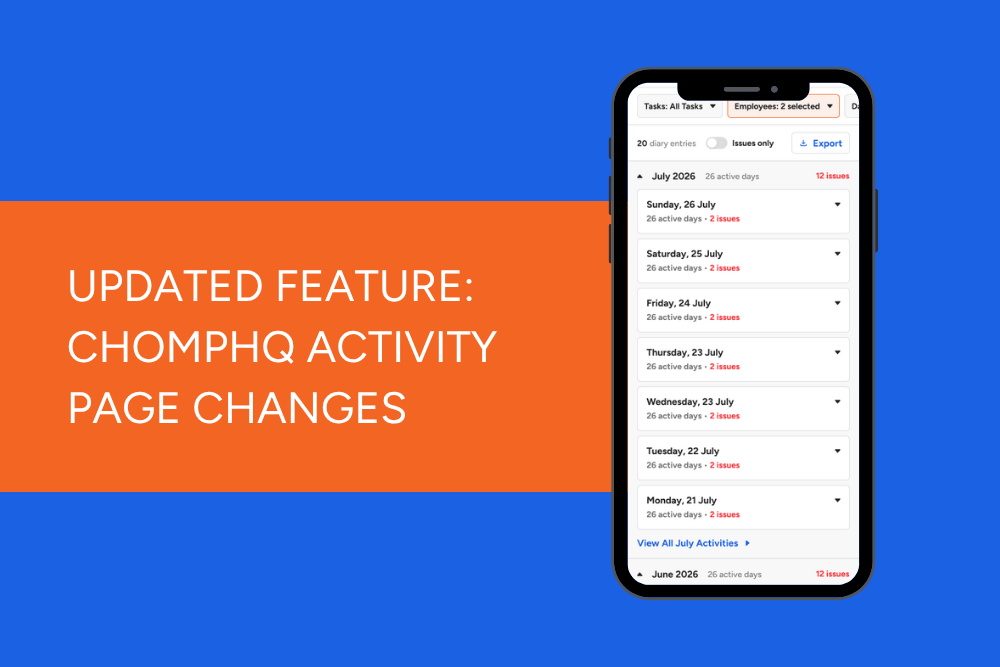
A fresh look for Venue Activity
Following the redesign of the Venue Dashboard and Team page, we're continuing to refresh ChompHQ to make it faster and easier to manage your food safety records.
Over the next couple of weeks, we'll be rolling out a brand-new look for the Venue Activity page.
The information you're used to seeing is still there, but it's now organised in a much clearer way, making it easier to scan activity, investigate issues, and find the information you're looking for.
What's new?
The new Venue Activity page groups diary entries by month, day, and task, giving you a much clearer picture of what's happened in your venue over time.
Instead of scrolling through a long list of individual entries, you can now quickly expand the dates and tasks you're interested in, keeping everything else neatly tucked away until you need it.
See more at a glance
We've added more useful information directly into the activity list, so you can spot potential issues without opening every diary entry.
You'll now be able to see:
- The number of diary entries completed each day
- Any issues recorded against that day
- Tasks that have alerts
- Completion progress for multi-step tasks
- Which team members completed each task
- Whether photos or notes have been added
This makes it much easier to identify where you may need to investigate further.
A better way to drill into diary entries
When you select a task, a new details panel opens from the right-hand side of the screen.
Rather than navigating away from the Activity page, you can review everything in one place, including:
- Diary entries and recorded measurements
- Notes
- Photos
- Who completed the task
- When it was completed
- Corrective actions
- Additional manager notes
- Task history
- Quick access to edit the task in Task Manager
For tasks with multiple diary entries on the same day, you can easily switch between entries using the tabs at the top of the panel.
Easier to find what you need
The filtering tools remain at the top of the page, allowing you to narrow results by:
- Task
- Employee
- Date range
We've also made the primary actions easier to find, including:
- Add Diary Entry
- Export
- Clear filters
This means less searching and fewer clicks to get where you need to go.
Why we made these changes
We heard from customers that while the previous Activity page contained all the right information, it could become difficult to navigate when reviewing large amounts of diary activity.
The redesign focuses on making information easier to scan while still allowing you to drill down into the detail when you need it.
The result is a cleaner, more organised experience that helps you:
- Find diary entries faster
- Investigate issues more efficiently
- Review task history with less clicking
- Manage large volumes of activity more easily
Coming soon
The new Venue Activity page will begin rolling out over the next couple of weeks.
There's nothing you need to do to prepare. When the update reaches your venue, you'll automatically see the new design the next time you log into ChompHQ.
As always, if you have any questions, our Customer Success team is here to help.
Explore more tutorials
- Tutorial - Chomp App (21)
- Tutorials: Management Dashboard (19)
- Chomp App (13)
- Chef v4 (5)
- Cooling Foods (3)
- Log In (3)
- food audit (3)
- proving method (3)
- Android (2)
- Apple (2)
- Food Safety App (2)
- QR Code (2)
- Updates (2)
- Audit Report (1)
- Brand Reputation (1)
- Food Safety Management (1)
- Influencer (1)
- Meat or Poultry (1)
- Product Update (1)
- Referral (1)
- Thermometers (1)
- received goods (1)
- suppliers (1)